• ShipSaaSDocumentation
  • Introduction
  • Getting Started
    • Installation
    • Environment Setup
    • Database Setup
    • Development Guide
  • Database
    • Repository Pattern
    • Drizzle Queries
    • Migration Workflow
    • Drizzle Studio
    • Best Practices
  • File Management
    • File Upload Component
    • Server Actions
    • Storage Configuration
  • Authentication Methods
    • Credentials Authentication
    • Magic Link Authentication
    • Two-Factor Authentication (2FA)
    • Social Authentication
    • API Keys & Bearer Tokens
    • Organizations (Multi-tenant)
  • Authorization & Permissions
    • Roles & Hierarchy
    • Route Protection
    • API Protection
    • CASL Permissions
  • Email & Notifications
    • Resend Setup
    • React Email Templates
    • Notification System
    • Email Workflows
    • Customization & Extension
  • Stripe & Payments
    • Stripe Setup
    • Better Auth Integration
    • Checkout Methods
    • Subscription Management
    • Admin Dashboard
    • Webhook Events
  • Architecture & Development
    • Presentation Layer
    • Service Layer
    • Persistence Layer
    • Helpers Architecture
    • Project Structure
    • Development Workflow
  • Testing
    • General Testing
    • Unit Testing
    • UI Component Testing
    • Repository Testing
    • Service Testing
    • End-to-End Testing
  • Deployment
    • Vercel Deployment
    • GitHub Actions CI/CD
    • Database Backup & Restore
    • Database Migrations
    • Troubleshooting Deployment
  • AI Agents Integration
  • Blog Management
    • Blog Setup
    • MDX Blog
    • Database Blog
  • Async Tasks
    • Setup
    • Email Workflows
    • Payment Processing
    • Maintenance Jobs
  1. Documentation
  2. Testing
Buydocschangelogsdemocommunity

Testing

PreviousDevelopment WorkflowNextGeneral Testing
On this page
Table of ContentsTesting ArchitectureTesting Stack & ConfigurationQuick Start GuideDetailed GuidesTesting by LayerEssential CommandsBest Practices SummaryTesting Guides

Testing

Complete testing strategy covering unit tests, integration tests, and end-to-end testing with real-world examples from the SaaS boilerplate.

Table of Contents

  • Testing Architecture
  • Testing Stack & Configuration
  • Quick Start Guide
  • Detailed Guides

Testing Architecture

The boilerplate implements a layered testing strategy that mirrors the application architecture:

6 Testing Layers: From general testing patterns to specific E2E workflows, each layer has its own purpose and tooling.

1. General Testing Patterns

  • Testing utilities and helpers
  • Common mocking patterns
  • Test data factories and builders

2. Unit Testing

  • Pure function testing
  • Utility and helper functions
  • Business logic validation

3. UI Component Testing

  • React component behavior
  • User interaction testing
  • Visual regression testing

4. Repository Testing

  • Database operations
  • Data layer validation
  • Transaction testing

5. Service Testing

  • Business logic and authorization
  • API integration testing
  • Error handling validation

6. End-to-End Testing

  • Complete user workflows
  • Cross-browser compatibility
  • Integration testing

Core Technologies:

  • Vitest: Fast unit and integration testing with TypeScript support
  • Playwright: Cross-browser E2E testing with visual regression
  • Testing Library: React component testing utilities
  • MSW: API mocking for integration tests

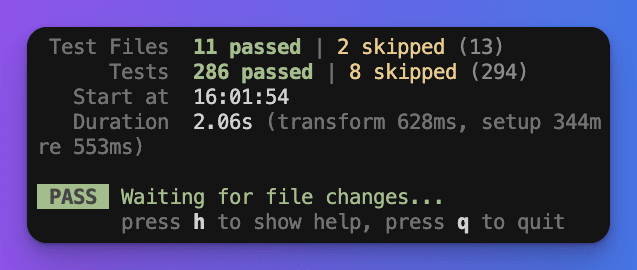
Testing Console Interface:

Vitest testing console interface

Multi-Environment Setup:

typescript
// vitest.config.ts - Environment separation
export default defineConfig({
  test: {
    projects: [
      {
        name: 'client',
        environment: 'jsdom',      // React components, UI logic
        include: ['src/**/*.test.{ts,tsx}'],
        exclude: ['src/services/**/*.test.{ts,tsx}'],
      },
      {
        name: 'server',
        environment: 'node',       // Services, business logic
        include: ['src/services/**/*.test.{ts,tsx}'],
      },
    ],
  },
})

Test Structure by Layer:

src/
โ”œโ”€โ”€ __tests__/                    # ๐Ÿ”ง General - Test setup & utilities
โ”‚   โ””โ”€โ”€ setup-test.ts
โ”œโ”€โ”€ lib/
โ”‚   โ””โ”€โ”€ __tests__/               # ๐Ÿงช Unit - Pure functions
โ”‚       โ””โ”€โ”€ crypto.test.ts
โ”œโ”€โ”€ app/
โ”‚   โ””โ”€โ”€ __tests__/               # ๐ŸŽจ UI Components
โ”‚       โ”œโ”€โ”€ home.test.tsx
โ”‚       โ””โ”€โ”€ theme.test.tsx
โ”œโ”€โ”€ db/
โ”‚   โ””โ”€โ”€ repositories/__tests__/  # ๐Ÿ—„๏ธ Repository Layer
โ”‚       โ””โ”€โ”€ user-repository.test.ts
โ”œโ”€โ”€ services/
โ”‚   โ”œโ”€โ”€ __tests__/               # โš™๏ธ Service Layer
โ”‚   โ”‚   โ”œโ”€โ”€ user-service.test.ts
โ”‚   โ”‚   โ””โ”€โ”€ organization-service.test.ts
โ”‚   โ””โ”€โ”€ authorization/__tests__/  # ๐Ÿ” Authorization
โ”‚       โ””โ”€โ”€ casl-authorization-service.test.ts
โ””โ”€โ”€ e2e/                         # ๐ŸŒ End-to-End
    โ”œโ”€โ”€ auth.spec.ts
    โ”œโ”€โ”€ homepage.spec.ts
    โ””โ”€โ”€ mobile.spec.ts

Testing Stack & Configuration

Core testing technologies and configuration patterns:

Multi-Project Setup:

typescript
// vitest.config.ts
import { defineConfig } from 'vitest/config'
import react from '@vitejs/plugin-react'
import tsconfigPaths from 'vite-tsconfig-paths'

export default defineConfig({
  plugins: [react(), tsconfigPaths()],
  test: {
    projects: [
      // Client-side tests (jsdom environment)
      {
        name: 'client',
        environment: 'jsdom',
        include: ['src/**/*.test.{ts,tsx}'],
        exclude: ['src/services/**/*.test.{ts,tsx}'],
        setupFiles: ['./src/__tests__/setup-test.ts'],
        globals: true,
      },
      // Server-side tests (node environment)
      {
        name: 'server',
        environment: 'node',
        include: ['src/services/**/*.test.{ts,tsx}'],
        setupFiles: ['./src/services/__tests__/setup-mocks.ts'],
        globals: true,
      },
    ],
  },
})

Key Features:

  • TypeScript Support: Full type checking during tests
  • Watch Mode: Automatic re-running on file changes
  • Coverage Reports: Built-in code coverage analysis
  • Parallel Execution: Tests run concurrently for speed

Cross-Browser E2E Setup:

typescript
// playwright.config.ts
import { defineConfig, devices } from '@playwright/test'

export default defineConfig({
  testDir: './e2e',
  fullyParallel: true,
  forbidOnly: !!process.env.CI,
  retries: process.env.CI ? 2 : 0,
  workers: process.env.CI ? 1 : undefined,
  reporter: 'html',
  use: {
    baseURL: 'http://localhost:3000',
    trace: 'on-first-retry',
    screenshot: 'only-on-failure',
  },
  projects: [
    {
      name: 'chromium',
      use: { ...devices['Desktop Chrome'] },
    },
    {
      name: 'firefox',
      use: { ...devices['Desktop Firefox'] },
    },
    {
      name: 'webkit',
      use: { ...devices['Desktop Safari'] },
    },
  ],
  webServer: {
    command: 'pnpm dev',
    url: 'http://localhost:3000',
    reuseExistingServer: !process.env.CI,
  },
})

Key Features:

  • Multi-Browser Testing: Chrome, Firefox, Safari
  • Visual Regression: Screenshot comparison
  • Mobile Testing: Device simulation
  • CI Optimization: Retry logic and reporting

Environment Files:

bash
# .env.test - Test environment variables
DATABASE_URL="postgresql://localhost:5432/test_db"
BETTER_AUTH_SECRET="test-secret-key"
BETTER_AUTH_URL="http://localhost:3000"
RESEND_API_KEY="re_test_key"
STRIPE_SECRET_KEY="sk_test_..."

Setup Files:

typescript
// src/__tests__/setup-test.ts - Client setup
import { beforeAll, afterEach } from 'vitest'
import { cleanup } from '@testing-library/react'
import '@testing-library/jest-dom'

beforeAll(() => {
  // Mock window objects, localStorage, etc.
})

afterEach(() => {
  cleanup()
})

// src/services/__tests__/setup-mocks.ts - Server setup
import { vi } from 'vitest'

vi.mock('@/services/authentication/auth-service', () => ({
  getAuthUser: vi.fn(),
}))

Quick Start Guide

Get started with testing in minutes:

Daily Testing Commands:

bash
# Run all tests
pnpm test                    # Run unit tests
pnpm test:e2e               # Run E2E tests

# Development workflow
pnpm test:watch             # Watch mode for unit tests
pnpm test:ui                # Open Vitest UI
pnpm test:e2e:ui            # Open Playwright UI

# Coverage and debugging
pnpm test:coverage          # Generate coverage report
pnpm test:e2e:headed        # E2E with visible browser

# Specific tests
pnpm test user-service      # Run matching pattern
pnpm test src/services/__tests__/user-service.test.ts

1. Create a Simple Unit Test:

typescript
// src/lib/__tests__/utils.test.ts
import { describe, it, expect } from 'vitest'
import { formatPrice, validateEmail } from '../utils'

describe('Utility Functions', () => {
  describe('formatPrice', () => {
    it('should format price correctly', () => {
      expect(formatPrice(1999)).toBe('$19.99')
      expect(formatPrice(0)).toBe('$0.00')
    })
  })

  describe('validateEmail', () => {
    it('should validate email format', () => {
      expect(validateEmail('test@example.com')).toBe(true)
      expect(validateEmail('invalid-email')).toBe(false)
    })
  })
})

2. Create a Component Test:

tsx
// src/components/__tests__/Button.test.tsx
import { render, screen, fireEvent } from '@testing-library/react'
import { describe, it, expect, vi } from 'vitest'
import { Button } from '../Button'

describe('Button Component', () => {
  it('should render button text', () => {
    render(<Button>Click me</Button>)
    expect(screen.getByRole('button')).toHaveTextContent('Click me')
  })

  it('should handle click events', () => {
    const handleClick = vi.fn()
    render(<Button onClick={handleClick}>Click me</Button>)

    fireEvent.click(screen.getByRole('button'))
    expect(handleClick).toHaveBeenCalledTimes(1)
  })
})

3. Create an E2E Test:

typescript
// e2e/basic-flow.spec.ts
import { test, expect } from '@playwright/test'

test('should navigate to login page', async ({ page }) => {
  await page.goto('/en')
  await page.click('a[href="/login"]')
  await expect(page).toHaveURL(/\/login/)
  await expect(page.locator('form')).toBeVisible()
})

Test Data Setup:

typescript
// Test data factory
const createTestUser = (overrides = {}) => ({
  id: crypto.randomUUID(),
  name: 'Test User',
  email: 'test@example.com',
  role: 'user' as const,
  emailVerified: true,
  createdAt: new Date(),
  ...overrides,
})

// Mock setup pattern
beforeEach(() => {
  vi.clearAllMocks()
  vi.mocked(getUserByIdDao).mockResolvedValue(createTestUser())
})

Assertion Patterns:

typescript
// Good assertions
expect(result).toMatchObject({
  id: expect.stringMatching(/^[0-9a-f-]{36}$/),
  email: 'test@example.com',
})

expect(result).toEqual(expect.objectContaining({
  name: 'Test User',
  role: 'user',
}))

// Error testing
await expect(service.getUserById('invalid')).rejects.toThrow('User not found')

Async Testing:

typescript
// Wait for async operations
await waitFor(() => {
  expect(screen.getByText('Loading...')).not.toBeInTheDocument()
})

// Test async service calls
it('should handle async user creation', async () => {
  const result = await createUserService(userData)
  expect(result.id).toBeDefined()
})

Detailed Guides

Comprehensive guides for each testing layer:

Testing by Layer

  • General Testing - Testing utilities, mocking patterns, and common setup
  • Unit Testing - Pure function testing with Vitest and TypeScript
  • UI Component Testing - React component testing with Testing Library
  • Repository Testing - Database layer testing with transactions and migrations
  • Service Testing - Business logic, authorization, and integration testing
  • E2E Testing - End-to-end workflows with Playwright

Essential Commands

bash
# Unit testing
pnpm test                    # Run all unit tests
pnpm test:watch             # Run tests in watch mode
pnpm test:coverage          # Generate coverage report
pnpm test:ui                # Open Vitest UI interface

# Specific test files
pnpm test user-service      # Run tests matching pattern
pnpm test src/services/__tests__/user-service.test.ts

# End-to-end testing
pnpm test:e2e               # Run all E2E tests
pnpm test:e2e:headed        # Run with visible browser
pnpm test:e2e:ui            # Open Playwright UI
bash
# Production testing pipeline
pnpm test --run --coverage    # Single run with coverage
pnpm test:e2e --reporter=json # E2E with JSON output
pnpm test --reporter=junit    # JUnit XML for CI

# Database testing
pnpm db:reset-seed            # Reset test database
pnpm db:migrate              # Run pending migrations
pnpm test src/db/__tests__   # Test database layer
bash
# Debug failing tests
DEBUG_TESTS=true pnpm test
pnpm test --reporter=verbose

# Visual debugging
pnpm test:e2e --debug        # Playwright debugger
pnpm test:e2e --headed       # See browser actions

# Performance analysis
pnpm test --reporter=html    # Detailed HTML report
pnpm test --coverage --reporter=lcov

Best Practices Summary

Testing Philosophy: Write tests that document behavior, catch regressions, and give confidence when refactoring. Focus on testing behavior, not implementation details.

Key Principles:

  • Test Isolation: Each test should be independent and repeatable
  • Descriptive Names: Test names should clearly describe what is being tested
  • Arrange-Act-Assert: Structure tests with clear setup, execution, and validation
  • Mock External Dependencies: Focus on testing your code, not third-party services
  • Test Edge Cases: Include error conditions and boundary cases

Performance Tips:

  • Use vi.clearAllMocks() in beforeEach to prevent test pollution
  • Run tests in parallel with proper environment separation
  • Mock heavy operations like database calls and API requests
  • Use test data factories for consistent, reusable test data

Testing Guides

๐Ÿงช

General Testing

Foundational patterns, mocking strategies, and testing philosophy

โšก

Unit Testing

Service functions, utilities, and isolated component logic

๐ŸŽจ

UI Component Testing

React components, user interactions, and UI behavior

๐Ÿ—„๏ธ

Repository Testing

Database operations, Drizzle queries, and data access patterns

โš™๏ธ

Service Testing

Business logic, authorization, and service layer integration

๐ŸŒ

E2E Testing

Full application flows, user journeys, and Playwright automation

Testing ready! The boilerplate includes comprehensive testing strategies that ensure code quality, catch regressions, and provide confidence when shipping new features.