The notification service provides intelligent notification management with automatic email sending based on notification criticality and user preferences.
Perfect for: User notifications, system alerts, authentication flows, and subscription communications with smart email delivery.
Core Service Functions
The notification service is located in src/services/notification-service.ts and provides several key functions:
Main Notification Creation
typescript
// From src/services/notification-service.ts
export const createTypedNotificationService = async <
  T extends NotificationType,
>(
  notificationParams: CreateTypedNotification<T>
)
This is the main function for creating notifications with automatic email handling.
Available Service Functions
typescript
// Typed notification with automatic email handling
createTypedNotificationService(notificationParams)

// Basic notification creation
createNotificationService(notificationParams, options)Critical vs Non-Critical Notifications
The system automatically classifies notifications into two categories:
🚨 Critical Notifications (Always Send Email)
Critical notifications bypass user preferences and always send emails:
typescript
// From src/services/notification-service.ts
const criticalTypes: NotificationType[] = [
  'reset_password',
  'email_verification',
  'change_email_verification',
  'magic_link',
  'otp_code',
  'security_alert',
  'password_changed',
  'organization_invitation',
  'subscription_created',
  'subscription_updated',
  'subscription_canceled',
  'subscription_deleted',
]
Why critical: These notifications are essential for security, authentication, or billing and must reach the user regardless of their notification preferences.
📢 Non-Critical Notifications (Respect User Preferences)
All other notification types respect the user's email notification settings:
- User must have
enableEmailNotifications: true - Notification channel must be
'email'or'both' - User can opt out of these notifications
Notification Types
The system supports 25+ notification types covering different areas:
Critical authentication notifications:
reset_password- Password reset requestsemail_verification- Email address verificationchange_email_verification- Email change confirmationmagic_link- Passwordless authenticationotp_code- Two-factor authentication codespassword_changed- Password change confirmationsecurity_alert- Security-related alerts
Smart Email Integration
The notification service automatically determines when to send emails:
Automatic Email Decision Logic
typescript
// From src/services/notification-service.ts
// Determine automatically if email is critical
const forceEmail = isCriticalNotification(notificationParams.type)

// Create notification with forced email option
return await createNotificationService(finalNotificationParams, {
  forceEmail,
})
User Preference Integration
For non-critical notifications, the system checks user settings:
typescript
// From src/services/notification-service.ts
const shouldSendEmail =
  options.forceEmail ||
  (userSettings?.enableEmailNotifications &&
    (userSettings?.notificationChannel === 'email' ||
     userSettings?.notificationChannel === 'both'))
Multi-Language Support
The service automatically loads translations based on user language preferences:
typescript
// From src/services/notification-service.ts
const userSettings = await getUserSettingsByUserIdDao(notificationParams.userId)
const userLanguage = userSettings?.language || 'fr'

const translations = await getTranslations({
  locale: userLanguage,
  namespace: `services.domain.notification.${notificationParams.type}`,
})
Authentication Integration
Better Auth seamlessly integrates with the notification service, creating typed notifications instead of sending emails directly. This ensures all authentication emails go through the centralized notification system.
Authentication Hooks Configuration
Better Auth is configured in src/lib/better-auth/auth.ts with hooks that create notifications:
typescript
// From src/lib/better-auth/auth.ts
emailAndPassword: {
  enabled: true,
  requireEmailVerification: AuthAppConfig.requireEmailVerification,
  sendResetPassword: async ({ user, url }) => {
    await createTypedNotificationService({
      userId: user.id,
      type: NotificationTypeConst.reset_password,
      metadata: { url },
    })
  },
},

emailVerification: {
  sendVerificationEmail: async ({ user, url }) => {
    await createTypedNotificationService({
      userId: user.id,
      type: NotificationTypeConst.email_verification,
      metadata: { url },
    })
  },
  sendOnSignUp: true,
  autoSignInAfterVerification: true,
  expiresIn: 3600, // 1 hour
},

user: {
  changeEmail: {
    enabled: AuthAppConfig.changeEmail,
    sendChangeEmailVerification: async ({ user, newEmail, url }) => {
      await createTypedNotificationService({
        userId: user.id,
        type: NotificationTypeConst.change_email_verification,
        metadata: {
          url,
          newEmail, // New email address included in metadata
        },
      })
    },
  },
}
Authentication Notification Types
Better Auth creates these critical notification types automatically:
reset_password- Password reset requestsemail_verification- Email address verificationchange_email_verification- Email change confirmationmagic_link- Passwordless authenticationotp_code- Two-factor authentication codes
Centralized approach: All authentication emails go through the notification service, ensuring consistent handling, user preferences respect, and centralized logging.
Usage Examples
Creating a Basic Notification
typescript
// Use the typed notification service for automatic handling
await createTypedNotificationService({
  userId: user.id,
  type: NotificationTypeConst.payment_succeeded,
  metadata: {
    amount: '$29.99',
    planName: 'Pro Plan'
  }
})
Creating a Critical Notification
typescript
// Security alert (critical - always sends email)
await createTypedNotificationService({
  userId: user.id,
  type: NotificationTypeConst.security_alert,
  title: 'Suspicious login detected',
  message: 'We detected a login from a new device',
  metadata: {
    ipAddress: '192.168.1.1',
    location: 'Paris, France'
  }
})
Creating with Custom Title/Message
typescript
// Override automatic translations
await createTypedNotificationService({
  userId: user.id,
  type: NotificationTypeConst.payment_succeeded,
  title: 'Custom payment confirmation',
  message: 'Your payment has been processed successfully',
})
Specific Email Integrations
The service handles specific email integrations for different notification types:
Authentication Email Handling
typescript
// Password reset emails
if (parsed.data.type === 'reset_password' && parsed.data.metadata?.url) {
  await sendResetPasswordLinkEmailService({
    email: targetUser.email,
    url: parsed.data.metadata.url as string,
  })
}

// Email verification
if (parsed.data.type === 'email_verification' && parsed.data.metadata?.url) {
  await sendVerificationEmailService({
    email: targetUser.email,
    url: parsed.data.metadata.url,
  })
}
Subscription Integration
typescript
// Subscription emails use rich subscription data
if (parsed.data.type === 'subscription_created' && parsed.data.metadata?.subscription) {
  await sendSubscriptionCompletedEmailService(
    parsed.data.metadata.subscription
  )
}
Error Handling
The service includes graceful error handling for email failures:
typescript
// From src/services/notification-service.ts
try {
  // Email sending logic...
} catch (emailError) {
  // Don't fail notification creation if email fails
  console.error("Erreur lors de l'envoi de l'email de notification:", emailError)
}
Graceful degradation: Notifications are still created even if email sending fails, ensuring the system remains functional.
User Interface
In-App Notifications Display
The application includes a built-in notification center that displays all user notifications with proper categorization and read/unread states.
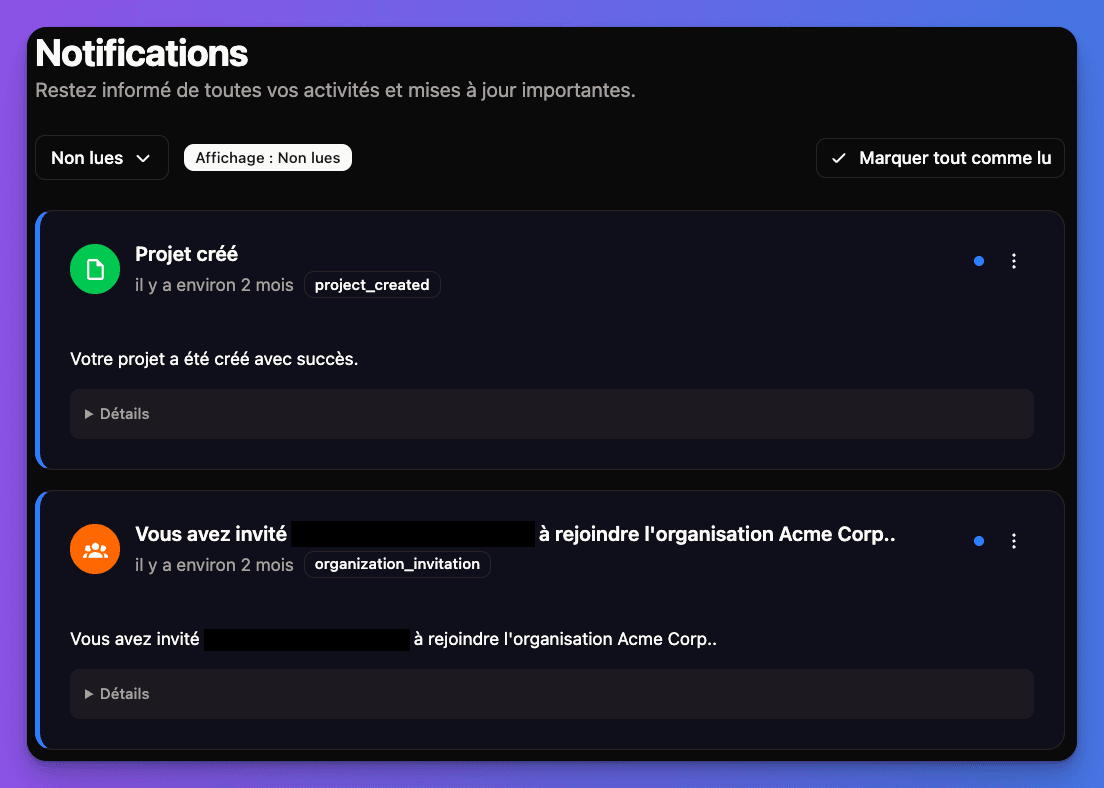
Interface Features:
- Real-time updates - Notifications appear instantly
- Categorized display - Grouped by type and importance
- Read/unread status - Clear visual indicators
- Action buttons - Direct actions from notifications
- Responsive design - Works on all device sizes
Notification Components:
- Bell icon indicator - Shows unread count
- Dropdown panel - Expandable notification list
- Notification cards - Individual notification display
- Timestamp display - Relative time formatting
- Action buttons - Context-specific actions
Smart notifications ready! Your application has intelligent notification management with automatic email integration and user preference respect.