The boilerplate provides TWO DISTINCT PAYMENT SYSTEMS to handle different business needs: Better Auth's external checkout for simplicity, and a comprehensive custom checkout system for advanced scenarios.
Important: These are two separate systems with different capabilities. Choose the one that best fits your business requirements.
Two Payment Systems Overview
External Checkout Only
- Stripe-hosted checkout pages (external redirect)
- Customer portal for subscription management
- Authenticated users only
- Automatic customer & subscription management
- Zero configuration required
Best for: Simple SaaS with standard subscription needs
Perfect for: Choose Better Auth for simplicity or Custom System for advanced features like guest checkout, installments, coupons, and multiple checkout methods.
System Architecture Comparison
Simple External Flow:
User Login → Better Auth Plugin → Stripe External Checkout → Customer Portal
Features:
- External Stripe checkout only
- Stripe customer portal for management
- Authenticated users required
- Automatic webhook processing
- Zero custom checkout code
Limitations:
- No guest checkout
- No custom checkout UI
- No installment payments
- No coupon integration
System Selection: Better Auth uses external Stripe checkout exclusively, while the Custom System detects checkout type via metadata (source: 'custom_checkout', guest_checkout: 'true') for intelligent routing.
System Components Breakdown
Automatic Integration
- Better Auth Stripe plugin (
src/lib/better-auth/auth.ts) - External Stripe checkout (redirect only)
- Customer portal integration
- Automatic webhook processing
User Flow:
- User must be authenticated
- Redirects to Stripe checkout
- Returns to success page
- Manages subscription via Stripe portal
Quick Setup Guide
1
Configure Stripe Keys
Set up your Stripe environment variables in .env.local:
bash
# Stripe Configuration
STRIPE_SECRET_KEY="sk_test_your_stripe_secret_key"
STRIPE_WEBHOOK_SECRET="whsec_your_webhook_secret"
NEXT_PUBLIC_STRIPE_PUBLISHABLE_KEY="pk_test_your_publishable_key"

# Checkout Method
NEXT_PUBLIC_STRIPE_CHECKOUT_TYPE="EmbededForm"
2
Choose Checkout Method
Select your preferred checkout experience:
EmbededForm- Integrated forms (recommended)ExternalForm- Stripe-hosted pagesReactStripeForm- Custom React integrationPaymentLink- Simple payment links
3
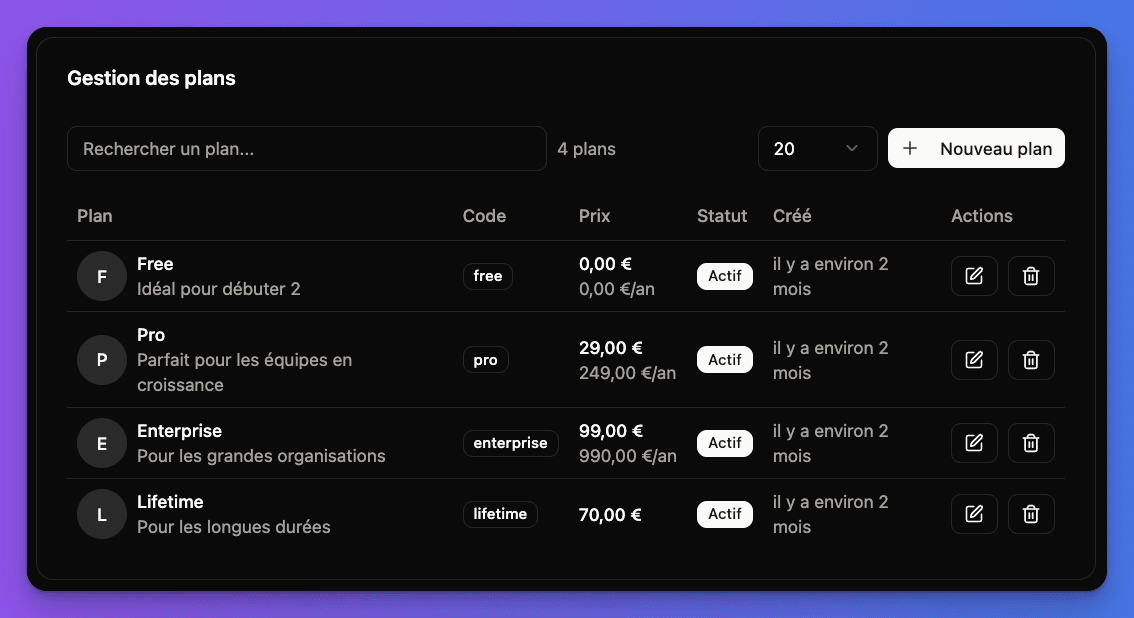
Configure Plans
Create your subscription plans in the admin panel at /admin/plans
Subscription Plans Interface:
4
Test Payments
Use Stripe test cards to verify your payment flow
Environment Variables
Required Stripe configuration for the payment system:
bash
# Server-side (Required)
STRIPE_SECRET_KEY="sk_test_..." # or sk_live_... for production
STRIPE_WEBHOOK_SECRET="whsec_..." # From Stripe Dashboard

# Client-side (Required)
NEXT_PUBLIC_STRIPE_PUBLISHABLE_KEY="pk_test_..." # or pk_live_...
NEXT_PUBLIC_STRIPE_CHECKOUT_TYPE="EmbededForm" # See checkout methods

# Optional
NEXT_PUBLIC_BILLING_MODE="subscription" # or "oneTime"
System Feature Comparison
🔌
Better Auth System
External checkout only
✅
Zero configuration setup✅
Automatic customer creation✅
Stripe customer portal✅
Real-time webhook sync❌
Guest checkout support❌
Custom checkout UI❌
Payment installments❌
Coupon integration🎯
Custom Boilerplate System
Complete checkout suite
✅
4 checkout methods✅
Guest checkout + auto-account✅
Payment installments (split)✅
Coupon code support✅
One-time or subscriptions✅
Multi-seat subscriptions✅
Custom webhook processing✅
Conversion optimizationWhich System Should You Choose?
Choose Better Auth System if:
- You want zero configuration
- Simple subscription model is sufficient
- Users can create accounts before purchasing
- You prefer Stripe-hosted checkout pages
- You don't need custom checkout flows
Choose Custom Boilerplate System if:
- You need guest checkout (no account required)
- You want to optimize conversion rates
- You need payment installments (BNPL)
- You want coupon/discount support
- You need multiple checkout methods
- You require custom checkout UI/UX
Pro Tip: You can start with Better Auth for simplicity and migrate to the Custom System later if you need advanced features like guest checkout or installments.
Stripe & Payments Topics
⚙️
Stripe Setup
Configure Stripe account, API keys, and webhook endpoints
🔌
Better Auth Integration
Stripe plugin configuration with automatic customer management
💳
Checkout Methods
4 flexible checkout options for different use cases
📊
Subscription Management
User subscription interface and plan management
👑
Admin Dashboard
Complete admin tools for plan and subscription management
🔄
Webhook Events
Automatic webhook processing and event handling
Payment system ready! Your application has enterprise-grade payment processing with flexible checkout options and comprehensive subscription management.