API Keys and Bearer Tokens allow programmatic access to your application. Perfect for integrations, mobile apps, and automated scripts.
Perfect for: Third-party integrations, mobile apps, CI/CD scripts, and automated workflows.
How to Activate
1
Enable token management
bash
# Enable API key management in user settings
NEXT_PUBLIC_BETTER_AUTH_TOKEN_MANAGEMENT=true
2
That's it!
API key management automatically appears in user settings at /[locale]/account/api-keys.
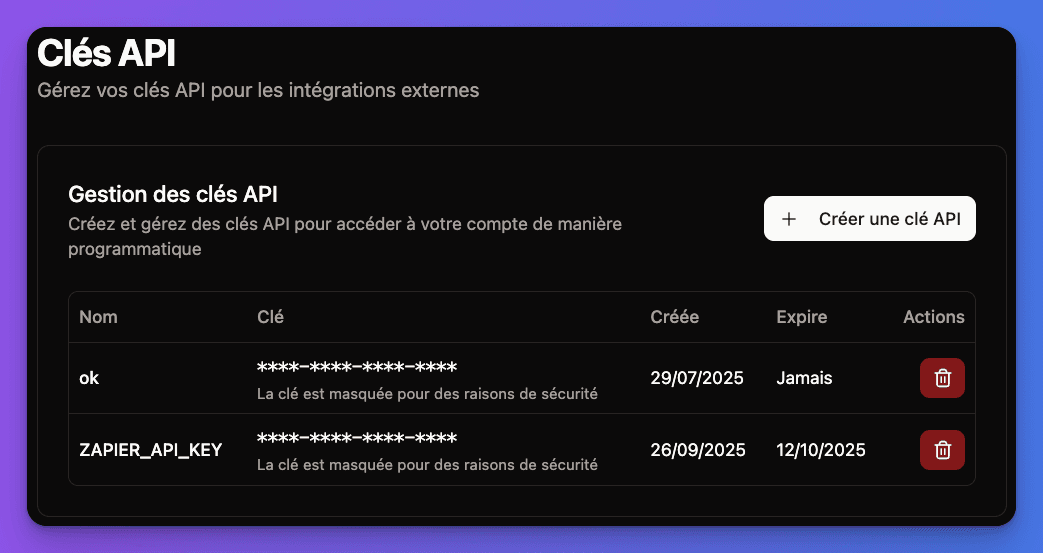
Types of Authentication Tokens
Long-lived tokens for applications
Characteristics:
- Custom names and descriptions
- Long expiration (or no expiration)
- User-managed (create/delete anytime)
- Perfect for server-to-server communication
Best for: Backend integrations, scheduled jobs, third-party services
Managing API Keys
Creating API Keys
1
Go to API Keys page
User visits /[locale]/account/api-keys in their account settings.
2
Create new API key
Click "Generate New API Key" button.
3
Configure the key
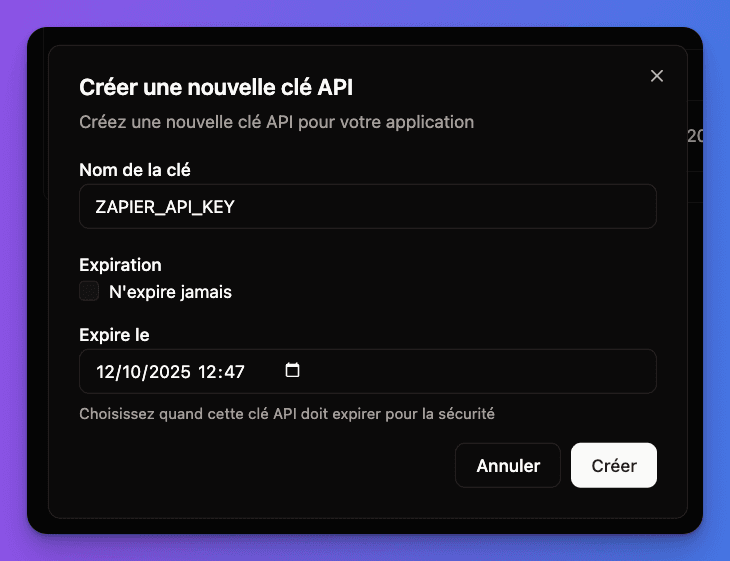
- Name: Give it a descriptive name (e.g., "Mobile App", "CI/CD Pipeline")
- Description: Optional notes about usage
- Expiration: Set expiration date or leave indefinite
4
Copy and store securely
API key is generated and displayed once only. User must copy and store it securely.
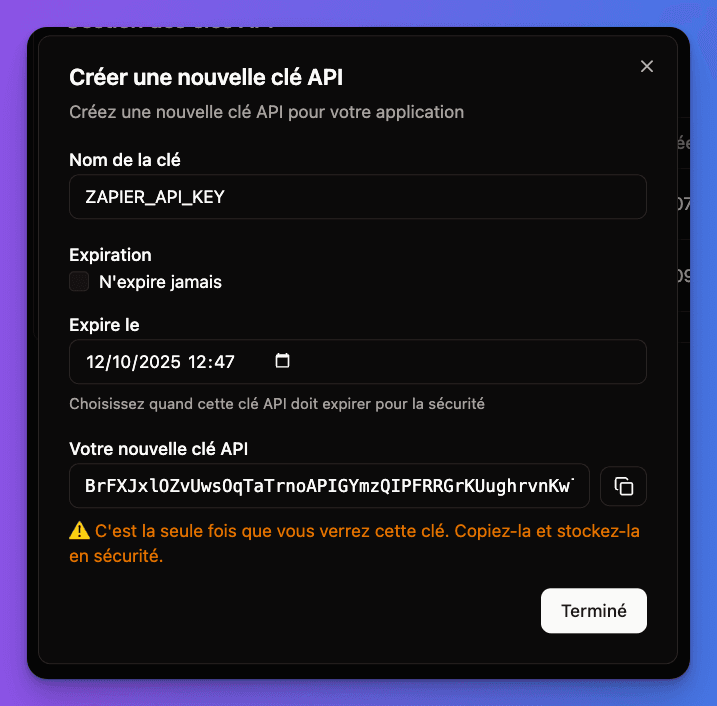
Important: API keys are shown only once during creation. If lost, the key must be deleted and recreated.
API Key Management Features
User can:
- View all keys - See name, creation date, last used
- Delete keys - Instantly revoke access
- Edit metadata - Update name and description
- Track usage - See when each key was last used
Security features:
- Keys are hashed in database
- Usage tracking with timestamps
- Instant revocation capability
- Rate limiting per key
API Key Generation Interface:
Using Tokens for API Access
API Key Authentication
bash
# Using API key in Authorization header
curl -H "Authorization: Bearer your-api-key-here" \
     https://yourdomain.com/api/protected-endpoint

# Alternative: Using API key header
curl -H "X-API-Key: your-api-key-here" \
https://yourdomain.com/api/protected-endpointBearer Token Authentication
Bearer tokens are typically obtained through login and used for subsequent API calls:
javascript
// 1. Login to get bearer token
const loginResponse = await fetch('/api/auth/login', {
  method: 'POST',
  headers: { 'Content-Type': 'application/json' },
  body: JSON.stringify({ email, password })
});

const { token } = await loginResponse.json();

// 2. Use bearer token for API calls
const apiResponse = await fetch('/api/user/profile', {
  headers: {
    'Authorization': `Bearer ${token}`,
    'Content-Type': 'application/json'
  }
});
Better Auth Integration
The token system uses Better Auth's apiKey and bearer plugins:
API Key Plugin
typescript
// In src/lib/better-auth/auth.ts
apiKey() // Enables API key generation and management
Bearer Plugin
typescript
// In src/lib/better-auth/auth.ts
bearer() // Enables JWT bearer token support
Token Validation
typescript
// Example API route protection
import { auth } from '@/lib/better-auth/auth'

export async function GET(request: Request) {
  const session = await auth.api.getSession({ headers: request.headers })

  if (!session) {
    return new Response('Unauthorized', { status: 401 })
  }

  // API logic here
  return Response.json({ data: 'protected data' })
}
Security Best Practices
Built-in security features:
- API keys are securely hashed in database
- Rate limiting prevents abuse
- Usage tracking for audit trails
- Instant revocation capability
For Developers
API Key Security:
- Store keys in environment variables, never in code
- Use different keys for different environments (dev/prod)
- Rotate keys regularly
- Delete unused keys immediately
Bearer Token Security:
- Tokens have automatic expiration
- Store securely (httpOnly cookies for web, keychain for mobile)
- Implement refresh token logic
- Never log tokens in application logs
For Users
Key Management:
- Use descriptive names for tracking
- Delete keys for decommissioned applications
- Monitor usage regularly
- Report suspicious activity
API Endpoints
The boilerplate includes standard API endpoints for token management:
typescript
// Token management endpoints
POST /api/auth/api-key/create    // Create new API key
GET  /api/auth/api-key/list      // List user's API keys
DELETE /api/auth/api-key/revoke  // Delete specific key

// Bearer token endpoints
POST /api/auth/login             // Get bearer token via login
POST /api/auth/refresh           // Refresh bearer token
POST /api/auth/logout            // Invalidate bearer token
Common Issues & Solutions
"Invalid API key" error?
- Check key is correctly copied (no extra spaces)
- Verify key hasn't been deleted or expired
- Ensure proper Authorization header format
- Check if key has required permissions
"Token expired" error?
- Bearer tokens have limited lifespan
- Implement automatic token refresh
- Check system clock synchronization
- Use refresh tokens for long-running apps
API key management not visible?
- Verify
NEXT_PUBLIC_BETTER_AUTH_TOKEN_MANAGEMENT=true - Check user has permission to generate keys
- Restart server after environment changes
- Ensure user is logged in and verified
Testing Checklist
1
Test API key creation
- Go to
/[locale]/account/api-keys - Create new API key with custom name
- Copy key and verify it's only shown once
- Test API call with new key
2
Test API key usage
- Make authenticated API call with key
- Try invalid key (should get 401 error)
- Test different API endpoints
- Verify usage tracking updates
3
Test key management
- View list of all created keys
- Delete unused key
- Verify deleted key no longer works
- Test key with expiration date
Integration Examples
Mobile App Integration
javascript
// Store API key securely in mobile app
const API_KEY = await SecureStore.getItemAsync('api_key');

const fetchUserData = async () => {
  const response = await fetch('/api/user/profile', {
    headers: {
      'Authorization': `Bearer ${API_KEY}`,
      'Content-Type': 'application/json'
    }
  });
  return response.json();
};
CI/CD Pipeline Integration
# GitHub Actions example
- name: Deploy with API
  env:
    API_KEY: ${{ secrets.API_KEY }}
  run: |
    curl -H "Authorization: Bearer $API_KEY" \
         -X POST https://yourdomain.com/api/deploy
All working? Your application now supports secure programmatic access via API keys and bearer tokens!