Configure Inngest in your SaaS application for reliable background task processing.
Installation
Inngest is already included in the boilerplate dependencies:
json
{
  "dependencies": {
    "inngest": "^3.x.x"
  }
}
Configuration
Inngest Client
The client is configured in src/lib/inngest/inngest.ts:
typescript
import {Inngest} from 'inngest'
import {APP_NAME} from '../constants'

export const inngest = new Inngest({id: APP_NAME})
API Route
The Inngest API endpoint is set up in src/app/api/inngest/route.ts:
typescript
import {serve} from 'inngest/next'
import {helloWorld, sendWelcomeFollowUpEmail} from '@/lib/inngest/functions'
import {inngest} from '@/lib/inngest/inngest'

export const {GET, POST, PUT} = serve({
  client: inngest,
  functions: [
    helloWorld,
    sendWelcomeFollowUpEmail,
    // Add your functions here
  ],
})
Development Setup
1
Start Next.js Server
Start your development server:
bash
pnpm dev2
Start Inngest Dev Server
In a separate terminal, start the Inngest development server:
bash
pnpm dlx inngest-cli@latest devThis starts the Inngest dashboard at http://localhost:8288
3
Verify Connection
Check that Inngest detects your functions:
- Open
http://localhost:8288 - Verify your functions are listed
- Test trigger a function manually
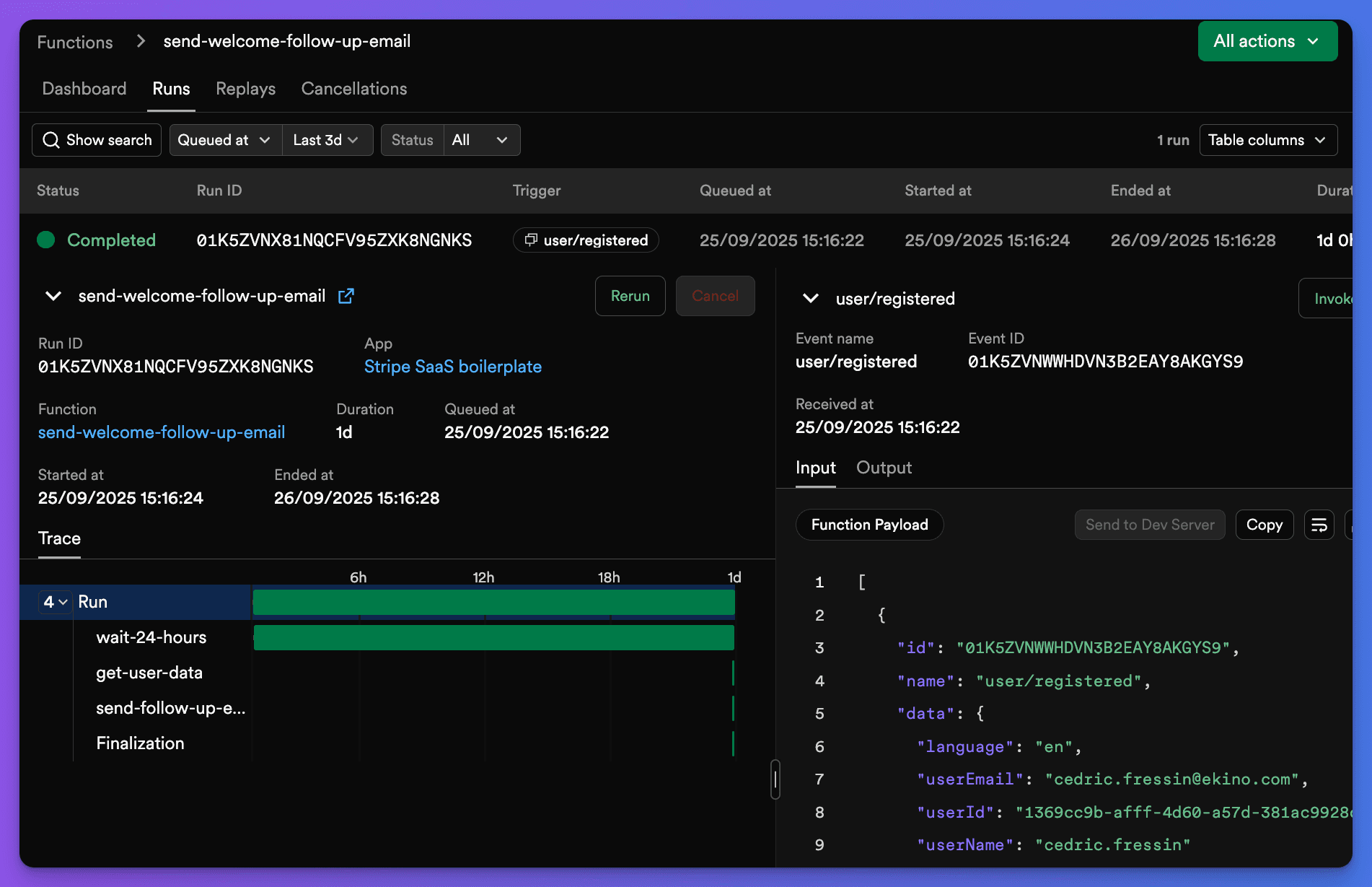
Inngest Dashboard Interface:
Project Structure
src/
├── lib/inngest/
│   ├── inngest.ts        # Inngest client configuration
│   ├── events.ts         # Event constants and helpers
│   └── functions.ts      # Function definitions
└── app/api/inngest/
    └── route.ts          # API endpoint for Inngest
Event System
Event Constants
Events are centralized in src/lib/inngest/events.ts:
typescript
export const INNGEST_EVENTS = {
  USER_REGISTERED: 'user/registered',
  TEST_HELLO_WORLD: 'test/hello.world',
} as const

export type InngestEventName =
  (typeof INNGEST_EVENTS)[keyof typeof INNGEST_EVENTS]
Event Helpers
Helper functions for triggering events:
typescript
export const triggerInngestWelcomeFollowUpEmail = async ({
  userId,
  userName,
  userEmail,
  language = 'fr',
}: {
  userId: string
  userName: string
  userEmail: string
  language?: 'fr' | 'en' | 'es'
}) => {
  return await inngest.send({
    name: INNGEST_EVENTS.USER_REGISTERED,
    data: {
      userId,
      userName,
      userEmail,
      language,
    },
  })
}
Environment Variables
No additional environment variables are required for local development. Inngest uses your API endpoint for communication.
Dashboard Access
The Inngest development dashboard provides:
- Function Overview: See all registered functions
- Execution History: View past runs and their status
- Manual Testing: Trigger functions with custom data
- Debug Logs: Inspect step-by-step execution
- Error Details: Analyze failed runs
Access at: http://localhost:8288
Next Steps
- Review the Email Workflows guide for practical examples
- Learn about Payment Processing with async tasks
- Set up Maintenance Jobs for data cleanup
The development server automatically detects function changes and updates the dashboard without restart.